Technology
Best Apps for Students in 2026: Study Better Every Day

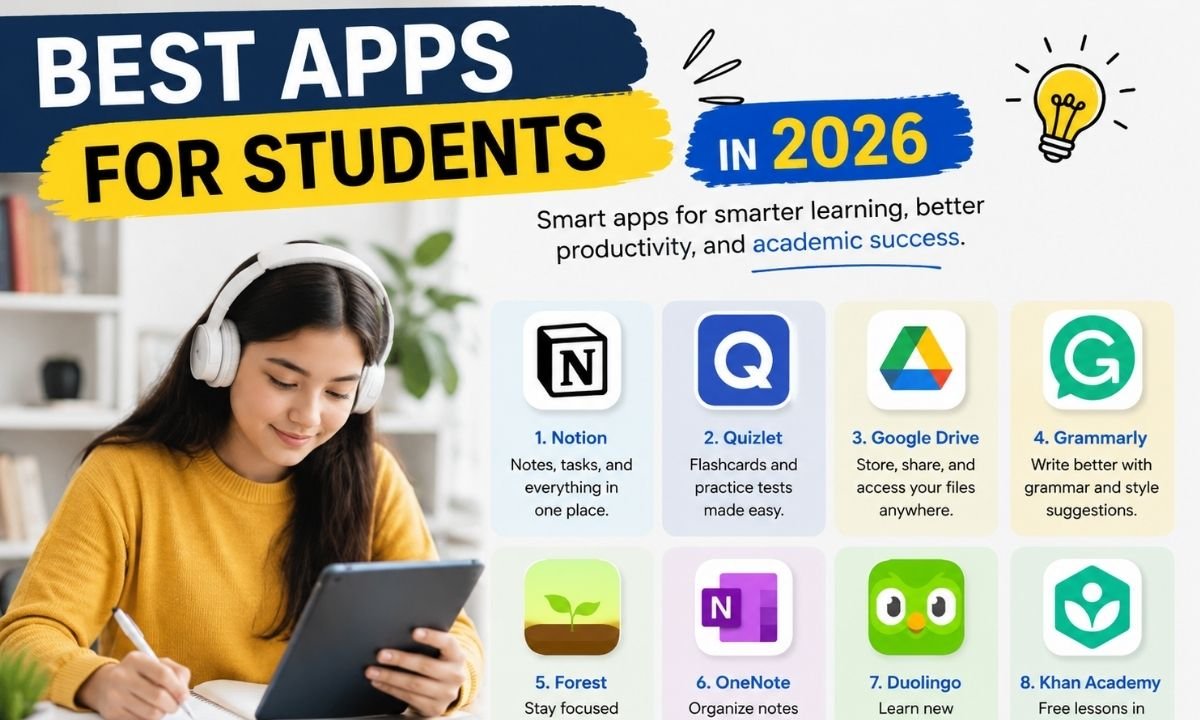
Notion is one of the best apps for students in 2026 because it can hold notes, tasks, class plans, reading lists, and project pages in one place. Students can make a dashboard for each subject. They can also add homework dates, lecture notes, links, and files. Notion is helpful for students who do not want five different notebooks. Notion’s education plan gives eligible students access to a free Plus plan for a one-member workspace, with unlimited pages and blocks, file uploads, more custom tools, and 30-day version history. Notion also added 2026 updates such as mobile AI and new model choices, which can help students work better on the go.
Best App for Flashcards and Exam Practice
Quizlet is a strong choice for students who want to remember facts, terms, dates, formulas, and definitions. It is one of the best apps for students in 2026 because it turns study time into active practice. Instead of only reading notes, students can test themselves. Quizlet says students can create flashcards, use study activities, and turn slides, videos, and notes into flashcards, practice tests, and study guides. This is useful for exams because active recall helps the brain remember more. A student can use Quizlet for science terms, history dates, language words, medical terms, or business concepts. It is simple, fast, and useful for daily revision.
Google Drive: Best App for Files and Group Work
Google Drive is still one of the best apps for students in 2026 because every student needs a safe place for files. Students can store notes, PDFs, slides, assignments, images, videos, and forms. Google Drive also helps with group work because students can share files and work together in real time. Google describes Drive as AI-powered cloud storage that lets teams store files in one place, collaborate in real time, and find files and insights faster. For students, this means fewer lost files and easier teamwork. It is also helpful when a teacher asks for a project link, a shared folder, or an online document.
Grammarly: Best App for Better Writing
Grammarly is useful for students who write essays, emails, reports, blog posts, and class assignments. It is one of the best apps for students in 2026 because writing clearly is still a key school skill. Grammarly says its student tool gives real-time help across everyday apps, including correctness and clarity suggestions, citation support, and plagiarism help. This is important because many students know their ideas but struggle to write them in clean English. Grammarly can help fix grammar, spelling, tone, and sentence flow. Still, students should use it as a helper, not as a full writer. The best work should sound like the student’s own voice.
Khan Academy and Khanmigo: Best App for Free Learning Help
Khan Academy is a trusted learning app for students who need help with math, science, economics, test prep, and more. In 2026, Khanmigo also makes Khan Academy more interesting for many learners. Khanmigo is described as an AI-powered learning tool that helps students think critically and solve problems without just giving direct answers. This is a big point. A good learning app should not only give answers. It should help the student understand the steps. This makes Khan Academy and Khanmigo useful for homework help, exam practice, and slow learning. It is best for students who want simple lessons and guided support.
Microsoft OneNote: Best App for Class Notes
Microsoft OneNote is a great app for students who like writing, typing, drawing, and saving notes by subject. It works well for class notes, lecture summaries, diagrams, and reading notes. Microsoft says OneNote helps in education by letting teachers organize lesson plans in searchable digital notebooks, while students can handwrite notes and sketch diagrams. OneNote Class Notebook also supports drawing tools, slide annotation, diagrams, and handwritten notes. This makes it one of the best apps for students in 2026, especially for students who use tablets or touchscreen laptops. It feels close to a paper notebook but gives better search and sync.
Todoist: Best App for Homework and Time Management
Todoist is a clean task app for students who forget homework, tests, meetings, or project dates. It is one of the best apps for students in 2026 because it makes planning simple. Todoist lets users capture tasks with natural language, schedule due dates, see the week in calendar view, and create recurring tasks. A student can type “math homework Friday” or “study biology every Monday,” and the app helps organize it. This is useful for students who feel busy but do not know where time is going. Todoist is best when used every morning or evening for a quick study plan.
Forest: Best App for Focus and Less Phone Use
Forest is a smart app for students who get distracted by phones. It uses a focus timer in a fun way. When a student starts a focus session, a virtual tree grows. If the student leaves the app too soon, the tree may stop growing. Forest says it is a mindful focus timer for digital detox and has been trusted by more than 60 million users since 2014. This makes it one of the best apps for students in 2026 for deep study. It is simple, but it works because it turns focus into a small game. Students can use it for reading, writing, revision, or exam prep.
Duolingo: Best App for Learning Languages
Duolingo is one of the best apps for students in 2026 who want to learn a new language in small daily lessons. It is useful for English, Spanish, French, German, Japanese, Korean, and many other languages. Duolingo has also added AI-powered speaking tools over time. Its Video Call feature lets learners practice realistic conversations with characters like Lily, and Duolingo announced a beginner Video Call with Falstaff in January 2026 for several major languages on iOS. This helps students practice speaking with less fear. Duolingo is best for daily practice, but serious learners should also speak with real people when possible.
How to Choose the Right Student Apps
The best apps for students in 2026 are not the same for every person. A high school student may need Quizlet and Google Drive. A college student may need Notion, Grammarly, and Todoist. A language learner may need Duolingo. A student who gets distracted may need Forest. The smart way is to choose apps by problem, not by popularity. If your notes are messy, use Notion or OneNote. If your writing is weak, use Grammarly. If exams are hard, use Quizlet and Khan Academy. If deadlines are the problem, use Todoist. If your phone steals your time, use Forest.
Best App Combination for Students in 2026
A good student app system should stay simple. Too many apps can create more stress. A strong setup can include Notion for planning, Google Drive for files, Quizlet for revision, Grammarly for writing, and Forest for focus. This gives students a full study system without making life confusing. Another simple setup is OneNote for notes, Todoist for tasks, Khan Academy for learning, and Duolingo for language practice. The best apps for students in 2026 should work together like a small study team. Each app should have one clear job. If an app does not save time or improve learning, remove it.
AI in Student Apps: Helpful but Use It Wisely
One of the biggest changes in 2026 is AI. Many student apps now use AI to make notes, explain lessons, build study guides, check writing, or support practice. This is helpful, but students must be careful. AI can save time, but it can also make students lazy if they let it do all the thinking. The best use of AI is support. Ask it to explain a topic, improve a sentence, build a quiz, or help plan study time. Do not use it to copy full assignments. Teachers want to see your own work. Smart students use AI to learn faster, not to avoid learning.
Final Thoughts
The best apps for students in 2026 are the apps that make learning easier, not harder. Notion helps with planning. Quizlet helps with memory. Google Drive protects files. Grammarly improves writing. Khan Academy explains lessons. OneNote keeps class notes clean. Todoist manages deadlines. Forest builds focus. Duolingo supports language learning. Together, these tools can help students study smarter and feel more in control. But the real secret is not downloading many apps. The secret is using the right apps every day. Start with two or three apps, build a simple routine, and keep improving your study system step by step.
FAQs
1. What are the best apps for students in 2026?
The best apps for students in 2026 include Notion, Quizlet, Google Drive, Grammarly, Khan Academy, OneNote, Todoist, Forest, and Duolingo. These apps help with notes, study, writing, focus, tasks, file storage, and language learning.
2. Which app is best for student notes?
Notion and Microsoft OneNote are two of the best note apps for students. Notion is better for dashboards, planning, and organized pages. OneNote is better for handwritten notes, drawings, class notebooks, and diagrams.
3. Which app is best for exam revision?
Quizlet is one of the best apps for exam revision because it helps students make flashcards and practice tests. Khan Academy is also useful because it explains topics in a simple way and helps students understand lessons step by step.
4. Which app helps students focus better?
Forest is a strong focus app for students. It uses a timer and a virtual tree system to help students stay away from phone distractions. It is best for study sessions, reading time, and exam preparation.
5. Are AI apps good for students in 2026?
Yes, AI apps can be good for students when used wisely. They can explain hard topics, check writing, make study guides, and save time. But students should not copy AI answers. They should use AI as a study helper.
6. What is the best free app for students?
Google Drive, Khan Academy, Duolingo, and Quizlet offer useful free tools for students. Notion also has an education plan for eligible students. The best free app depends on what the student needs most.
7. How many apps should a student use?
A student should use only a few apps that solve real problems. Three to five apps are enough for most students. Too many apps can become confusing. A simple system is easier to follow every day.


Top Benefits of Choosing a Velo Electrique Puissant for Urban Commuting

Michelle Gumbel: What to Know About Greg Gumbel’s Daughter

Theodora Holmes Husband: How She Built a Private Life With Troy Polamalu

Jean Taynton Age: What We Know About John Lithgow’s First Wife

Summer Odalis Beckham Age: Meet Odell Beckham Jr.’s Youngest Sister

David Hefner Age: How Old Is Hugh Hefner’s Son Today?

Meet Samantha Rotunda: The Woman Once Married to Bray Wyatt

Who Was Amy Arnaz? Life Story of Desi Arnaz Jr.’s Wife

Kirsten Barlow Age: How Old Is Joe Lando’s Wife Today?

Alma Gonzales Today: What Happened After Richard Thomas?
Top Benefits of Choosing a Velo Electrique Puissant for Urban Commuting
Michelle Gumbel: What to Know About Greg Gumbel’s Daughter
Theodora Holmes Husband: How She Built a Private Life With Troy Polamalu
Jean Taynton Age: What We Know About John Lithgow’s First Wife
Summer Odalis Beckham Age: Meet Odell Beckham Jr.’s Youngest Sister
David Hefner Age: How Old Is Hugh Hefner’s Son Today?
Meet Samantha Rotunda: The Woman Once Married to Bray Wyatt
Who Was Amy Arnaz? Life Story of Desi Arnaz Jr.’s Wife
Kirsten Barlow Age: How Old Is Joe Lando’s Wife Today?
Alma Gonzales Today: What Happened After Richard Thomas?
-

 Celebrity3 months ago
Leonardo DiCaprio Daughter: The Real Story in 2026
-

 Entertainment3 months ago
What Is Latest Entertainment News 2026? Big Updates in Movies, Music, and TV
-
 Technology3 months ago
Best Budget Gadgets for Students in 2026: Smart Tools That Save Money
-

 Tech3 months ago
Android Tips 2026: Simple Guide for 2026