
Tech
Android Tips For Students Features: Simple Guide for 2026

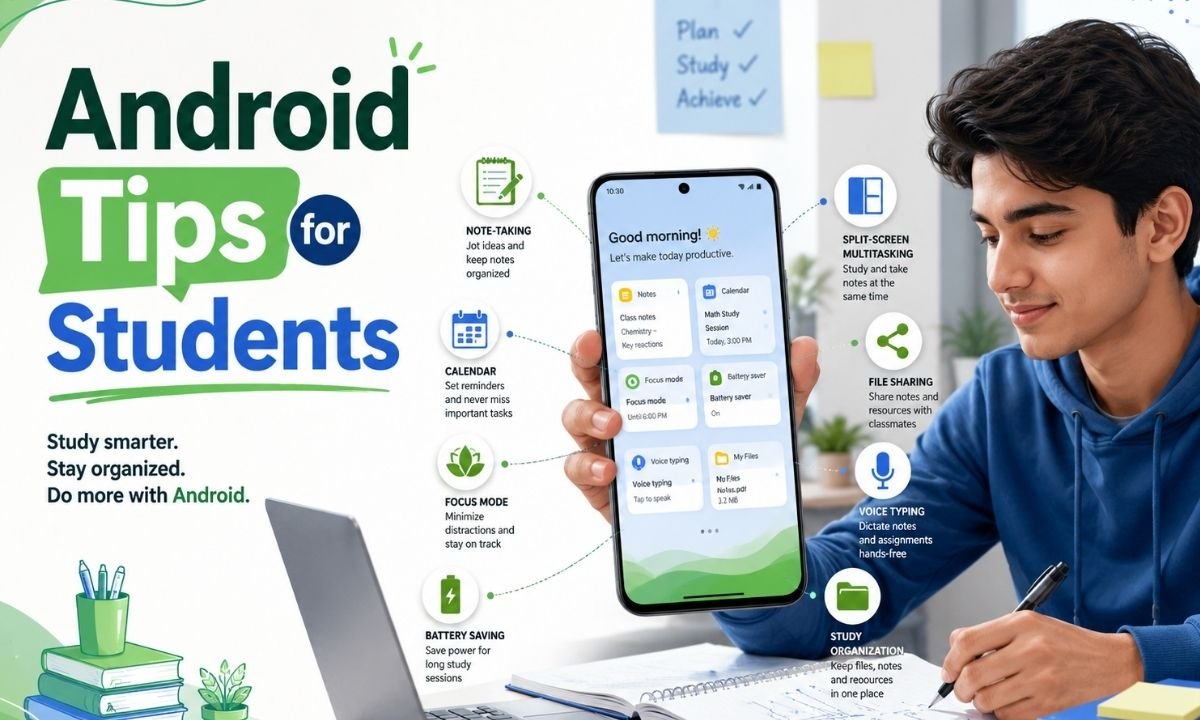
Android tips for students features are more useful in 2026 than ever before. A student does not need a costly laptop for every small task. A good Android phone can help with notes, homework, reading, file sharing, planning, and online classes. Many students already carry their phone all day. The smart step is to use it like a study tool, not only for games, chats, and videos. Android now gives students better tools for focus, search, sharing, privacy, AI help, and school planning. Google’s current Android feature pages highlight AI tools, Quick Share, Circle to Search, connected devices, privacy controls, and protection features, but feature support can still depend on phone model, country, carrier, and Android version.
What Are Android Tips For Students Features?
Android tips for students features mean simple phone tools that help students learn faster and stay organized. These features include Focus Mode, calendar reminders, split screen, Quick Share, voice typing, file backup, AI help, screen search, and security settings. The best part is that many of these tools are already inside Android or Google apps. Students do not always need to install many extra apps. They only need to learn how to use the phone in a better way. A student can turn one device into a notebook, scanner, planner, dictionary, file manager, and study timer.
Why Android Is Helpful for Students in 2026
Android is helpful because it is flexible. Students can use phones from many brands and price ranges. They can also use Google apps like Drive, Docs, Gmail, Calendar, Keep, and Photos. Android also supports sharing between phones, Chromebooks, and some Windows computers through Quick Share. Google says Quick Share can send files to nearby Android devices, Chromebooks, and select Windows PCs, which is very useful for moving notes, PDFs, images, and class projects. For students, this saves time because they do not need a cable for every file transfer.
Use Focus Mode During Study Time
Focus Mode is one of the best android tips for students features because it helps stop distractions. Students often lose time because of social media, games, and random alerts. With Focus Mode, students can pause selected apps for a set time. Google’s Android Help explains that Focus Mode lets users choose distracting apps, pause them, and stop notifications from those apps while Focus Mode is on. It can also be scheduled. A student can set it for homework time, test prep, or reading time. This makes the phone feel less noisy and more like a real study device.
Control Notifications Before They Control You
Notifications can break attention in seconds. A student may open one message and then waste thirty minutes. Android tips for students features should always include better notification control. Students can use Do Not Disturb, app notification settings, and Android’s newer notification tools to reduce noise. Android’s latest feature page says Android 16 includes notification summaries and a notification organizer that can recap longer conversations and group lower priority notifications. This can help students check important updates without reading every message during class or study time.
Use Split Screen for Smart Multitasking
Split screen is very useful for students who need two apps at the same time. A student can open a video lecture on one side and notes on the other side. They can read a PDF while writing key points in Google Docs. They can also compare a homework question with a web page. Android support pages also show newer multitasking ideas like desktop windowing and connected displays, where supported devices can move and resize apps from full screen or split screen. This makes Android better for tablets, foldables, and phones connected to bigger screens.
Share Notes Fast With Quick Share
Quick Share is one of the most practical android tips for students features. It helps students send notes, images, PDFs, videos, and class files to nearby devices. A student can share a group project file with a classmate without opening email. Google’s Android page says Quick Share can instantly share high-resolution photos and videos to nearby devices. Android Help also says users can share content by opening the file, tapping Share, choosing Quick Share, and selecting a nearby device. For school work, this is simple, fast, and cleaner than sending files through many chat apps.
Use Circle to Search for Fast Learning
Circle to Search is a powerful 2026 study feature. It lets students search what they see on the screen without switching apps. A student can circle a word, formula, image, map, object, or phrase and search it quickly. Google says Circle to Search lets users search anything on the phone by tapping, scribbling, highlighting, or circling. This is helpful when reading science notes, history articles, or foreign words. It can also translate on-screen text, which is useful for students who study in more than one language.
Get Study Help From Gemini Carefully
Gemini can help students brainstorm ideas, explain hard topics, create study plans, and practice questions. Google describes Gemini as an AI assistant that can help with writing, planning, brainstorming, and more. Android’s Gemini page says some Android devices come with Gemini as the main assistant, while other users can download the Gemini app or switch to it as their mobile assistant. Students should use AI as a helper, not as a shortcut for cheating. The smart way is to ask Gemini to explain a chapter, make a quiz, simplify a paragraph, or check an outline.
Turn Android Into a Digital Notebook
A phone can become a clean digital notebook when students use the right apps. Google Keep is good for short notes and lists. Google Docs is better for essays and assignments. Voice typing can help students write faster when they have many ideas. The camera can also capture whiteboard notes, book pages, and diagrams. Android tips for students features should include one simple rule: keep school files in folders. Students can create folders for each subject, such as Math, English, Science, and History. This small habit saves time before exams.
Use Calendar and Reminders for Better Planning
Many students forget homework because they trust memory too much. Android Calendar and reminder tools can solve this problem. Students can add exam dates, homework deadlines, online class links, and study sessions. They can set reminders one day before and one hour before important tasks. This makes school life less stressful. A weekly study plan is even better. For example, a student can set Monday for math revision, Tuesday for science notes, and Wednesday for essay writing. When reminders are used daily, Android becomes a personal study coach.
Save Battery, Storage, and Mobile Data
Battery life matters during school, college, and travel. Students should use Battery Saver when power is low. They should lower screen brightness, close unused apps, and download notes for offline use. Storage is also important. Old videos, duplicate images, and unused apps can slow down the phone. Students should clean storage often and move important files to cloud backup. For mobile data, students can download lectures on Wi-Fi, use offline maps when needed, and turn off background data for apps that waste internet. These android tips for students features are simple, but they make the phone more reliable.
Protect Your Phone and School Data
Students keep many private things on their phones. These may include school accounts, photos, passwords, emails, and payment apps. So security is not optional. Android users should use a strong screen lock, update apps, check app permissions, and avoid unknown links. Android’s main site highlights proactive protection and privacy controls as part of the Android experience. Students should also turn on Find My Device or similar tracking tools. If the phone is lost, this can help locate, lock, or protect the device. A secure phone keeps study data and personal data safer.
Best Daily Android Study Routine for Students
The best way to use android tips for students features is to build a daily routine. In the morning, check Calendar for tasks. During class, take notes in one app. During homework time, turn on Focus Mode. For research, use Circle to Search and Gemini wisely. For group work, use Quick Share. At night, upload important files to cloud storage and set reminders for the next day. This routine is not hard. It only needs practice. After a few weeks, students can feel more organized, less distracted, and more ready for school work.
Final Thoughts
Android tips for students features can make school life easier in 2026. A student can use one phone for notes, planning, research, reminders, file sharing, and focus. The key is not to use every feature at once. Start with Focus Mode, Calendar, Quick Share, and file folders. Then add Circle to Search, Gemini, split screen, and privacy settings. When used wisely, Android becomes more than a phone. It becomes a simple study partner that helps students save time, stay calm, and learn better every day.
FAQs
What are the best android tips for students features in 2026?
The best android tips for students features in 2026 include Focus Mode, Quick Share, Circle to Search, Gemini, split screen, Calendar reminders, voice typing, file backup, and privacy controls. These tools help students study, plan, share files, and avoid distractions. The best feature depends on the student’s daily problem. If the student wastes time, Focus Mode is best. If the student handles many files, Quick Share and Drive are more useful.
How can Android help students study better?
Android can help students study better by keeping notes, saving files, setting reminders, blocking distractions, and giving fast research help. A student can use Google Docs for writing, Calendar for planning, Keep for quick notes, and Circle to Search for quick learning. The phone becomes more helpful when the student removes useless apps from the home screen and keeps study apps easy to find.
Is Gemini useful for students?
Yes, Gemini can be useful for students when used in the right way. It can explain topics, create study questions, make outlines, and help students understand difficult text. Students should not copy answers without learning. They should use Gemini like a tutor. A good prompt is, “Explain this topic in simple words and give me five practice questions.” This helps learning more than copying full homework.
How can students stop distractions on Android?
Students can stop distractions by using Focus Mode, Do Not Disturb, and app timers. Focus Mode pauses selected apps and blocks notifications from them while it is active. Students can also remove social media apps from the home screen. Another smart step is to keep only study apps on the first screen. This makes the phone less tempting during study time.
Is Quick Share good for school work?
Yes, Quick Share is very good for school work. It helps students send files, photos, videos, PDFs, and notes to nearby Android devices, Chromebooks, and select Windows PCs. This is useful for group projects, class notes, and presentations. It is faster than emailing small files again and again. Students should still check that they are sharing with the correct device before sending private files.
Which Android feature is best for online classes?
Split screen is one of the best Android features for online classes. Students can watch a lesson and take notes at the same time. Calendar reminders are also helpful because they stop students from missing class times. Battery Saver is useful when attending online classes away from a charger. Together, these features make online learning smoother.
Are all Android student features available on every phone?
No, all features are not available on every Android phone. Some features depend on Android version, device brand, country, language, and hardware. Google also notes that product availability, features, and specifications can vary by region, carrier, and device. Students should check their phone settings and update their phone when updates are available.

Top Benefits of Choosing a Velo Electrique Puissant for Urban Commuting

Michelle Gumbel: What to Know About Greg Gumbel’s Daughter

Theodora Holmes Husband: How She Built a Private Life With Troy Polamalu

Jean Taynton Age: What We Know About John Lithgow’s First Wife

Summer Odalis Beckham Age: Meet Odell Beckham Jr.’s Youngest Sister

David Hefner Age: How Old Is Hugh Hefner’s Son Today?

Meet Samantha Rotunda: The Woman Once Married to Bray Wyatt

Who Was Amy Arnaz? Life Story of Desi Arnaz Jr.’s Wife

Kirsten Barlow Age: How Old Is Joe Lando’s Wife Today?

Alma Gonzales Today: What Happened After Richard Thomas?
Top Benefits of Choosing a Velo Electrique Puissant for Urban Commuting
Michelle Gumbel: What to Know About Greg Gumbel’s Daughter
Theodora Holmes Husband: How She Built a Private Life With Troy Polamalu
Jean Taynton Age: What We Know About John Lithgow’s First Wife
Summer Odalis Beckham Age: Meet Odell Beckham Jr.’s Youngest Sister
David Hefner Age: How Old Is Hugh Hefner’s Son Today?
Meet Samantha Rotunda: The Woman Once Married to Bray Wyatt
Who Was Amy Arnaz? Life Story of Desi Arnaz Jr.’s Wife
Kirsten Barlow Age: How Old Is Joe Lando’s Wife Today?
Alma Gonzales Today: What Happened After Richard Thomas?
-

 Celebrity3 months ago
Leonardo DiCaprio Daughter: The Real Story in 2026
-

 Entertainment3 months ago
What Is Latest Entertainment News 2026? Big Updates in Movies, Music, and TV
-

 Technology3 months ago
Best Budget Gadgets for Students in 2026: Smart Tools That Save Money
-

 Celebrity3 months ago
Celebrity Wife Biography: Why Fans Search for Famous Family Stories