AI Tools
How to Use ChatGPT for Blogging: Simple Guide for New Writers

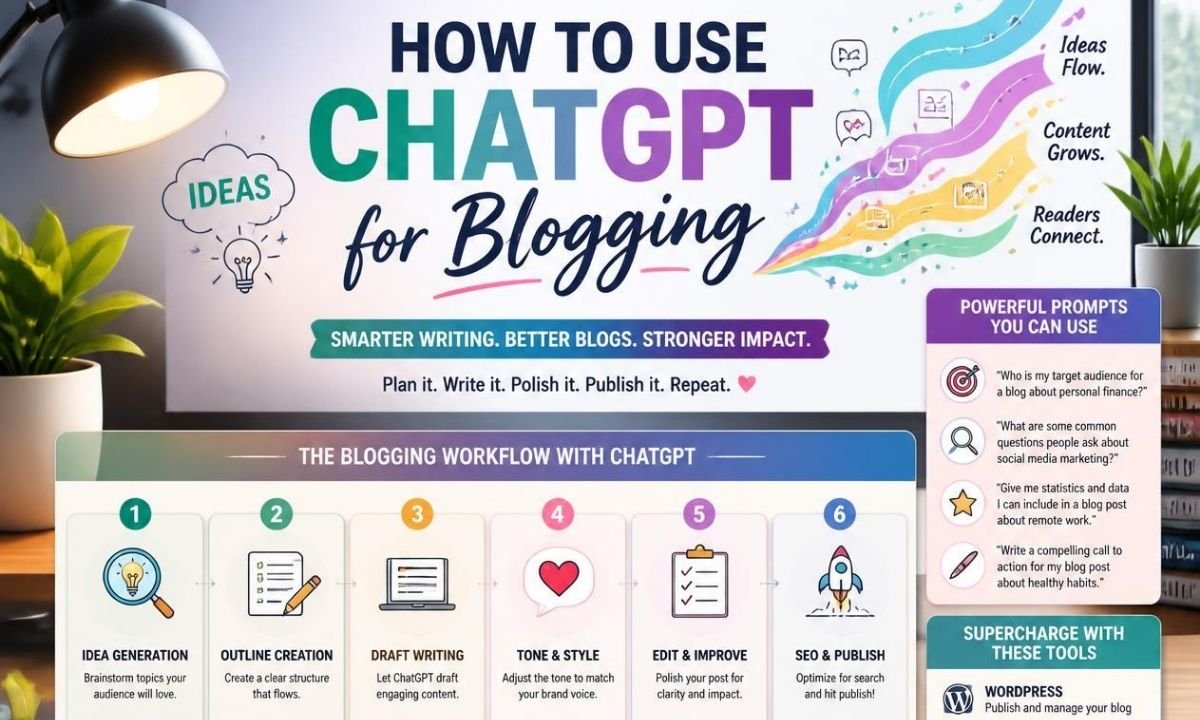
Many new writers want to start a blog, but they feel stuck before they write the first line. They may have ideas, but they do not know how to turn those ideas into a full post. This is where learning how to use ChatGPT for blogging can help. ChatGPT can support you with ideas, outlines, drafts, titles, editing, and simple SEO planning.
OpenAI says ChatGPT can help users draft, revise, and refine written work with better structure, tone, and purpose. Still, it should not replace your own thinking. A good blog needs your real voice, your facts, and your experience. ChatGPT is best used like a writing helper. It can save time, remove confusion, and make the writing process easier for beginners.
What Is How to Use ChatGPT for Blogging?
How to use ChatGPT for blogging means using ChatGPT as a smart writing assistant for blog work. You can ask it to suggest blog topics, create an outline, explain hard ideas, write a first draft, improve weak sentences, and check if the content is easy to read. For new writers, this is useful because a blank page can feel scary.
ChatGPT gives you a starting point. Then you can edit the content and make it sound like you. OpenAI’s prompt guide says a good prompt should explain the task, give useful context, and describe the output you want. This is very important for blogging. If your prompt is clear, your blog draft will be much better.
Why Bloggers Use ChatGPT in 2026
Blogging in 2026 is not only about writing many words. It is about helping readers fast. People want simple answers, fresh ideas, and clear steps. Search engines also reward helpful content that solves real problems. This is why many bloggers use ChatGPT to plan better articles. It can help you think of reader questions before you write. It can also help you build a post that has a clear title, simple headings, and useful sections. OpenAI also notes that ChatGPT can work with prompts, tools, files, writing, data analysis, and workflows for common work tasks. For bloggers, this means you can use one tool for many parts of your content process.
Start With a Clear Blog Topic
The first step in how to use ChatGPT for blogging is choosing a clear topic. Do not ask ChatGPT to “write a blog post” with no details. That type of prompt is too broad. Instead, tell it your niche, reader level, keyword, title idea, and goal. For example, you can say, “Give me 10 blog ideas for beginners who want to learn simple tech tips.” You can also ask it to find different angles for one topic. A good angle makes your article more useful. It can turn a basic topic into something more interesting. For example, “best laptops” is broad, but “best low-cost laptops for students in 2026” is more focused.
Use ChatGPT to Make Better Titles
A strong blog title helps readers decide if they should click. ChatGPT can help you create many title ideas in seconds. You can ask for simple titles, emotional titles, SEO titles, or beginner-friendly titles. But do not choose the first title without thinking. Read each title like a real reader. Ask yourself if it is clear, honest, and useful. A good title should include the main keyword when possible. It should also show the benefit of the article. For example, “How to Use ChatGPT for Blogging: Simple Guide for New Writers” is clear because it tells the reader what they will learn and who it is for.
Build a Strong Outline Before Writing
A good outline is like a road map. It helps you know where the article is going. When learning how to use ChatGPT for blogging, always ask for an outline before asking for a full article. The outline should include the introduction, main headings, subheadings, conclusion, and FAQs. This helps you keep the post organized. It also stops the article from jumping from one idea to another. You can ask ChatGPT to make the outline simple, detailed, or SEO-focused. After it gives you the outline, review it. Add missing points. Remove weak sections. Then use the final outline to write a better post.
Write the First Draft With Your Own Direction
ChatGPT can write a first draft, but you should guide it well. Tell it the word count, tone, reading level, keyword, and format. You can also tell it what not to do. For example, you can ask it not to use hard words, not to add fake facts, and not to overuse the keyword. This makes the draft cleaner. The first draft does not need to be perfect. It is only the base. Your job is to check every line. Add your own examples. Add facts you trust. Remove parts that sound too general. This is how you keep the article human and original.
Use ChatGPT for SEO Without Keyword Stuffing
SEO is important, but readers come first. ChatGPT can help you place your keyword in the title, first paragraph, headings, and body text. But the keyword should feel natural. If you use how to use ChatGPT for blogging too many times, the article may sound robotic. A better plan is to use the main keyword in key places and use related phrases in the rest of the article. These related phrases can include “ChatGPT blog writing,” “AI blogging tips,” “blog outline,” “SEO blog post,” and “content writing help.” This makes the article easier to read. It also helps search engines understand the topic.
Improve Readability With ChatGPT

Many blog readers do not want long and hard sentences. They want clear words and short paragraphs. You can ask ChatGPT to rewrite a section in simple English. You can also ask it to lower the reading level without making the writing sound childish. This is helpful for bloggers who want a grade 5 to grade 8 style. ChatGPT can shorten long sentences, replace hard words, and make the message smoother. But you should still read the final text yourself. Sometimes simple writing can become too plain. Add a little warmth, story, or example so the post feels alive.
Use ChatGPT for Research Support, But Check Facts
ChatGPT can help you understand a topic faster, but you should always check important facts. This is very important for news, tools, prices, health, law, finance, and product details. ChatGPT Search is available in ChatGPT and can help users get web-based answers when search is needed. OpenAI has also shared that ChatGPT search became available to everyone in supported regions, with no signup required for logged-out free users after the February 2025 update. For blogging, this means you can use current sources when the topic changes often. But do not copy from sources. Read, understand, and write in your own words.
Use Files, Projects, and Notes for Better Blog Work
One useful 2026 blogging method is to keep your blog notes organized. ChatGPT Projects can group chats, uploaded reference files, and custom instructions so work stays on topic. This can help if you run one blog with many content plans. You can keep your brand voice, keyword list, old article notes, and content rules in one place. OpenAI’s help page also says ChatGPT can automatically save uploaded and created files in a file library so they can be used later. For a blogger, this can make planning easier. You can reuse old outlines, update older posts, and keep research notes together.
Edit the Blog Post Like a Human Writer
After ChatGPT helps with a draft, editing is the most important step. Read the article out loud. Check if each paragraph teaches something useful. Remove repeated ideas. Add your own opinion where it fits. Make sure the content has a clear start, middle, and end. Also check if the intro answers the reader’s problem fast. A strong blog post should not feel like a machine wrote it. It should feel like a helpful person is talking to the reader. This is the real secret of how to use ChatGPT for blogging. Use AI for support, but use your own judgment for quality.
Common Mistakes New Writers Should Avoid
New writers often make a few mistakes when they start using ChatGPT. They ask very short prompts. They accept the first draft. They add too many keywords. They forget to check facts. They publish content that sounds too broad. These mistakes can hurt the blog. A better way is to ask clear prompts, review each section, and improve the article before posting. You should also avoid fake personal stories or fake data. If you do not know something, say it clearly or research it first. Honest content builds trust. Trust is one of the strongest parts of blogging in 2026.
Final Thoughts
Learning how to use ChatGPT for blogging can make writing easier for new bloggers. It can help you find ideas, build outlines, write drafts, improve SEO, and edit weak sections. But ChatGPT is not a magic button. The best blog posts still need real care. You must check facts, add your own voice, and focus on the reader. Use ChatGPT like a smart helper, not like the full writer. When you mix AI support with human editing, your blog can become clearer, faster, and more helpful. That is the best way to use ChatGPT for blogging in 2026.
FAQs
1. Can beginners use ChatGPT for blogging?
Yes, beginners can use ChatGPT for blogging. It is useful because it helps with ideas, outlines, drafts, titles, and editing. A new writer can ask simple questions and get quick help. But beginners should not publish the first answer without checking it. They should edit the text, add their own thoughts, and make sure the article is true and helpful.
2. Is ChatGPT good for SEO blog writing?
ChatGPT can help with SEO blog writing when you use it the right way. It can suggest keywords, headings, meta descriptions, and article outlines. It can also help make the content easier to read. Still, SEO needs human review. You should check search intent, update facts, and make sure the article gives real value to readers.
3. How do I write a good prompt for a blog post?
A good prompt should include the topic, keyword, audience, tone, word count, headings, and goal. You can also include rules like simple English, no copied content, and short sentences. For example, you can say, “Write a beginner-friendly blog outline about how to use ChatGPT for blogging with simple headings and SEO tips.”
4. Can ChatGPT write a full blog post?
Yes, ChatGPT can help write a full blog post. But the final post should be edited by a human. You need to check facts, improve weak parts, and add your own examples. This makes the article more original and useful. A full AI draft is only the starting point, not the final product.
5. How can I make ChatGPT content sound human?
You can make ChatGPT content sound human by adding real examples, short stories, simple words, and your own opinion. You can also ask ChatGPT to rewrite the content in a warm and natural tone. After that, read the article yourself and remove anything that sounds too formal, repeated, or robotic.
6. Should I use ChatGPT for every blog post?
You can use ChatGPT for many blog posts, but you should not depend on it for everything. It is best for planning, drafting, editing, and idea support. Your blog still needs your own knowledge and style. Readers want useful content, not only fast content. So use ChatGPT to speed up your work, then make the final article your own.
7. What is the best way to use ChatGPT for blogging in 2026?
The best way is to use ChatGPT step by step. First, ask for topic ideas. Next, create an outline. Then write a draft. After that, ask for editing help. Finally, check the facts and improve the post with your own voice. This process helps you create better blog posts without losing quality.


Top Benefits of Choosing a Velo Electrique Puissant for Urban Commuting

Michelle Gumbel: What to Know About Greg Gumbel’s Daughter

Theodora Holmes Husband: How She Built a Private Life With Troy Polamalu

Jean Taynton Age: What We Know About John Lithgow’s First Wife

Summer Odalis Beckham Age: Meet Odell Beckham Jr.’s Youngest Sister

David Hefner Age: How Old Is Hugh Hefner’s Son Today?

Meet Samantha Rotunda: The Woman Once Married to Bray Wyatt

Who Was Amy Arnaz? Life Story of Desi Arnaz Jr.’s Wife

Kirsten Barlow Age: How Old Is Joe Lando’s Wife Today?

Alma Gonzales Today: What Happened After Richard Thomas?
Top Benefits of Choosing a Velo Electrique Puissant for Urban Commuting
Michelle Gumbel: What to Know About Greg Gumbel’s Daughter
Theodora Holmes Husband: How She Built a Private Life With Troy Polamalu
Jean Taynton Age: What We Know About John Lithgow’s First Wife
Summer Odalis Beckham Age: Meet Odell Beckham Jr.’s Youngest Sister
David Hefner Age: How Old Is Hugh Hefner’s Son Today?
Meet Samantha Rotunda: The Woman Once Married to Bray Wyatt
Who Was Amy Arnaz? Life Story of Desi Arnaz Jr.’s Wife
Kirsten Barlow Age: How Old Is Joe Lando’s Wife Today?
Alma Gonzales Today: What Happened After Richard Thomas?
-

 Celebrity3 months ago
Leonardo DiCaprio Daughter: The Real Story in 2026
-

 Entertainment3 months ago
What Is Latest Entertainment News 2026? Big Updates in Movies, Music, and TV
-

 Technology3 months ago
Best Budget Gadgets for Students in 2026: Smart Tools That Save Money
-

 Celebrity3 months ago
Celebrity Wife Biography: Why Fans Search for Famous Family Stories